A real-time meeting assistant is software that records, transcribes, and summarizes meetings, often extracting action items and key decisions as conversations unfold or immediately afterward. While these tools promise efficiency, their true power often remains untapped by rigid native integrations. To truly unleash advanced, context-aware automation, businesses must look beyond default settings. This requires a deeper dive into AI automation strategy, understanding how to build systems that perfectly align with unique operational demands. Generic integrations simply create data silos and miss critical context, which can be incredibly frustrating.
⚡ Key Takeaways
- Native meeting assistant integrations are often too restrictive for unique business needs.
- n8n empowers hyper-personalized workflows, connecting Fireflies.ai data to your CRM, PM tools, and communication channels.
- Granular control over data (e.g., sentiment, talk time, privacy filtering) transforms raw meeting insights into actionable intelligence.
The Automation Gap: Why Native Fireflies.ai Integrations Aren’t Enough
Most real-time meeting assistant tools offer a handful of direct integrations. These are convenient for basic tasks, but they hit a wall fast. Imagine Fireflies.ai capturing crucial sales call data – sentiment scores, talk time, specific commitments. A generic integration might just dump a transcript into your CRM. But what about automatically updating the deal stage based on positive sentiment? Or creating a follow-up task in ClickUp if a specific keyword is detected? These advanced scenarios are often impossible with off-the-shelf connections, leaving valuable data stranded. How much time are you losing to these limitations?
Meeting Ends
(Fireflies.ai)➡️
Webhook Trigger
(n8n Listener)➡️
Extract & Filter
(n8n Logic)➡️
Create Tasks
(ClickUp)➡️
Share Summary
(Slack)➡️
Update CRM
(HubSpot)
Building Your Custom Real-Time Meeting Assistant Workflow in n8n
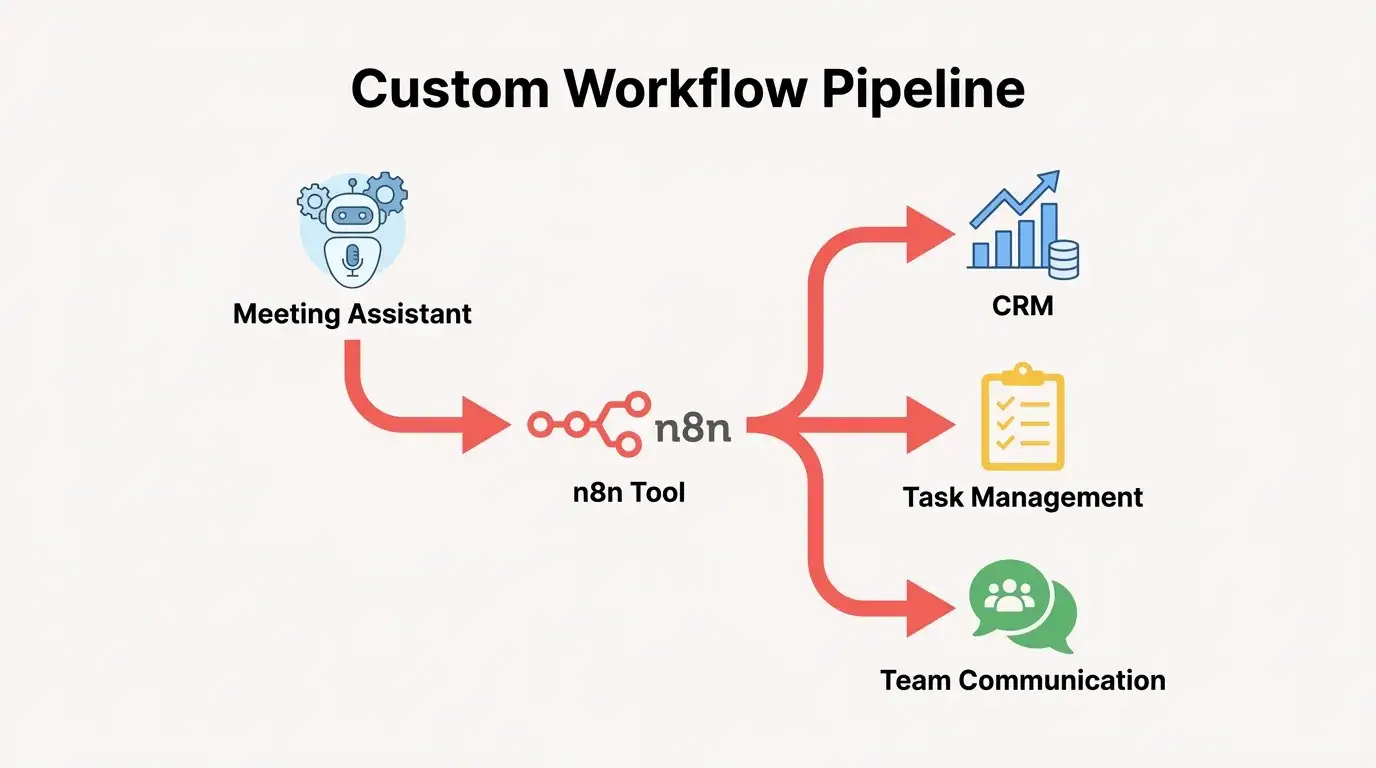
Building a custom workflow with Fireflies.ai and n8n begins by configuring Fireflies.ai to send a webhook notification (a real-time alert) when a meeting ends. This webhook carries a rich JSON payload of data – including the transcript, summary, action items, sentiment score, talk time, and participant lists. Your n8n workflow starts with a ‘Webhook’ trigger node, listening for this exact payload. From there, you’ll use n8n’s powerful nodes to parse the JSON, extract specific action items, filter based on your criteria, and then push this tailored data to your other tools. For instance, action items can be routed to ClickUp to create new tasks automatically. A concise summary can be sent directly to a relevant Slack channel. Most critically, granular data like “Sentiment Score” and “Talk Time” can be mapped directly to custom fields within your HubSpot CRM, enriching deal records instantly. This transforms raw meeting data into immediate, actionable intelligence, making your real-time meeting assistant truly intelligent and responsive to your unique business logic.
Scale Your Business, Not Your Headcount
The secret to 10x growth isn’t working harder; it’s smarter systems. From CRM syncs to autonomous AI agents, we build the infrastructure that runs your business on autopilot.
The Goodish Agency Fireflies.ai Custom Integration Workflow Planner
| Desired Outcome | Trigger Event | Fireflies.ai Data Points | n8n Node(s) Required | Target System/Action | Complexity Estimate |
|---|---|---|---|---|---|
| Update CRM Deal Stage & Notes | Meeting End (Webhook) | Sentiment Score, Talk Time, Summary, Participants | Webhook, JSON, HubSpot, IF Condition | HubSpot (Update Deal, Add Note) | Medium |
| Automate ClickUp Task Creation | Meeting End (Webhook) | Action Items, Participants, Meeting Title | Webhook, JSON, Split In Batches, ClickUp | ClickUp (Create Task) | Low-Medium |
| Slack Channel Summary & Alerts | Meeting End (Webhook) | Summary, Action Items, Speaker Stats | Webhook, JSON, Slack, IF Condition | Slack (Send Message) | Low |
| Filter & Archive Internal Meetings | Meeting End (Webhook) | Meeting Title, Participants, Keywords | Webhook, JSON, IF Condition, Google Drive/CRM | Internal Archive/Skip CRM Update | Medium |
Mastering Privacy & Precision: Filtering Automated Meeting Data
One critical advantage of a custom n8n workflow is granular control over data privacy. Businesses frequently express concern about sensitive internal meetings being processed and routed to external systems. With n8n, you can implement specific conditional logic at the start of your workflow. For example, you might analyze the `meeting_title`, `participants` list, or even specific keywords within the transcript to identify internal-only meetings. If the conditions are met (e.g., all participants are from the same internal domain, or the title contains “Internal Sync”), the workflow can be instructed to terminate. This prevents any data from being sent to external tools like HubSpot or ClickUp. It ensures compliance and peace of mind – a level of precision rarely available with generic integrations. Goodish Agency implements such safeguards for all client automation.
Beyond Basic Bots: The Future of Meeting Intelligence
Reliance on default settings limits what your real-time meeting assistant can do for your business. Custom integrations with tools like n8n transform meeting data from simple records into a strategic asset. It’s about empowering your team with truly actionable insights, automated task flows, and precise control over sensitive information. The future of meeting intelligence isn’t just about transcription; it’s about seamlessly integrating that intelligence into every facet of your operations, precisely tuned to your business needs.
Enhanced CRM Data
Sentiment, Talk Time, Deal InsightsAutomated Task Management
ClickUp, Jira, AsanaReal-Time Team Alignment
Slack, MS Teams SummariesGranular Privacy Control
Filter Internal Meetings