Ever wonder how your customers move from device to device? In today’s digital world, figuring out their full journey isn’t just nice to have – it’s absolutely essential. GA4 User ID Tracking is a smart method in Google Analytics 4. It gives a persistent, unique ID to each individual user, letting you stitch together all their activity across different devices and sessions. This capability goes beyond what cookie-based tracking can do, offering you a complete picture of user behavior, from their very first interaction all the way to conversion and beyond. For businesses aiming to build comprehensive customer profiles and drive measurable returns, mastering this setup is super important. To truly harness the strategic advantages of GA4 and other crucial tools like GTM, you’ll find a comprehensive guide to GA4 consulting and generative engine optimization is key to staying ahead in 2026.
⚡ Key Takeaways
- GA4 User ID is crucial for connecting user activity across devices, giving you a unified view of their customer journey.
- Successful setup needs a strong Data Layer design, advanced GTM configuration, and careful checking.
- Using User ID data lets you create personalized customer journeys, deeply integrate with your CRM, and directly measure ROI, especially in industries with high churn.
The Identity Crisis: Why Traditional Tracking Just Doesn’t Cut It in a Cross-Device World
Think about Sarah, a potential customer. She browses your site on her work computer, then adds a product to her cart on her phone during lunch, and finally buys it from her home tablet that evening. Without a consistent identifier, Google Analytics 4 (GA4) would typically treat these interactions as three separate users. Isn’t that frustrating? This fragmentation totally obscures your *true* customer journey. It makes it really tough to accurately attribute conversions or even grasp the impact of different touchpoints.
The Limitations of Client ID and Google Signals Alone
While GA4 offers a few ways to identify users, Client ID and Google Signals each have their own big limitations. Client ID relies on a browser cookie, meaning it resets if a user clears their cookies, uses a different browser, or switches devices. It simply can’t link a user across their phone and laptop. Google Signals *does* offer some cross-device linking by using logged-in Google accounts. But remember, it gives you aggregated, modeled data. This means it’s not ideal for deep, individual-level analysis or direct CRM integration. Neither option gives you the deterministic, first-party data (that’s data you collect directly from *your* users, not guessed or third-party sourced) you need for precise customer journey mapping.
The Business Imperative: Understanding the Full Customer Journey
For SaaS businesses and those in high-churn industries, understanding the full customer journey isn’t just about analytics; it’s about survival. Knowing precisely when a user interacts with your marketing, downloads your app, signs up for a trial, hits a snag, or converts – across every device they use – directly impacts retention and their lifetime value. Without a unified view, efforts to personalize experiences, spot at-risk users, or accurately calculate ROI become pure guesswork. GA4 User ID tracking bridges this gap, providing a crucial foundation for truly understanding user identity.
GA4 User ID Setup in 2026: A Future-Proof Implementation Guide
Implementing GA4 User ID tracking effectively calls for careful planning and a solid technical setup. Your goal is to consistently send a unique, non-personally identifiable ID for each logged-in user to GA4, no matter their device or session.
Core Requirements: Setting Up Your Data Layer for Success
The Data Layer is the backbone of any advanced GA4 implementation. Before you send a User ID, your website or app *must* reliably push this identifier into the Data Layer. This ID should be available as soon as a user logs in and persist across all relevant pages. For example, after a successful login, your development team should push an event like this:
window.dataLayer = window.dataLayer || [];
window.dataLayer.push({
  'event': 'user_login',
  'user_id': 'ABC12345', // Your internal unique user ID
  'user_segment': 'premium_subscriber'
});
The `user_id` here should be a stable, internal identifier that doesn’t directly expose Personal Identifiable Information (PII) like names or emails. Consider using a hashed version of an email address (converting it into a fixed-length string of characters) or a unique GUID (Globally Unique Identifier) from your database. Consistency across all your data streams (web, iOS app, Android app) is super important.
Advanced GTM Configuration for Robust User ID Transmission
With your Data Layer properly structured, Google Tag Manager (GTM) becomes your main channel for sending that `user_id` to GA4. Here’s how to do it, step-by-step:
- Create a Data Layer Variable: In GTM, create a new Data Layer Variable. Name it `user_id` (or whatever you used in your `dataLayer.push()`). This variable will grab the value from your Data Layer.
- Configure the GA4 Configuration Tag: Open your existing GA4 Configuration Tag. Under “Fields to Set,” add a new row. The “Field Name” should be `user_id` (this is a reserved field name in GA4 for this specific purpose). The “Value” should be your newly created Data Layer Variable `{{user_id}}`.
- Set the User ID at Login (and potentially throughout the session): Make sure this `user_id` field is set *before* any other events for that user are triggered. A common approach is to trigger the GA4 Configuration Tag to refresh, or fire an initial GA4 event (like `page_view`), right after the `user_id` is available in the Data Layer. This ensures the ID is associated with all subsequent events for that session.
Avoiding Common Pitfalls: Debugging and Validation Techniques
Setting up GA4 User ID tracking can definitely get tricky! Here are some common pitfalls and how to steer clear of them:
- Inconsistent ID Generation: Double-check that the `user_id` your backend generates is truly unique and stable for each user, across *all* platforms.
- Timing Issues: The `user_id` simply *must* be available in the Data Layer *before* the GA4 tag fires on any page where a user is logged in. Use GTM’s preview mode to verify your Data Layer contents and the tag firing order.
- PII Exposure: Never, ever send raw email addresses, names, or other direct PII (Personal Identifiable Information) as the `user_id`. Always hash it or use an internal, non-identifiable key.
- Cross-Stream Discrepancies: If you’re working with both web and app data streams, verify that you’re sending the exact same `user_id` format and values from both.
Validation: Use GA4’s DebugView to watch incoming events live. Filter by your `user_id` to see if events are being correctly attributed. You’ll want to look for the `user_id` parameter within the event details. For broader validation, once data starts flowing, check the User Explorer report in GA4; you should see unique User IDs grouping sessions together.
Turn Your Data Into Revenue
Join 40+ innovative brands using Goodish to unlock the “Why” behind user behavior. From server-side tagging to advanced retention modeling—we handle the tech so you can handle the growth.
Beyond the Basics: Activating Your GA4 User ID Data for Strategic Advantage
Collecting User ID data is just the start. The real value comes from *using* this data to create personalized customer journeys and drive measurable business outcomes. It’s about moving past just knowing “what happened” to truly understanding “who did what” and “why it matters.”
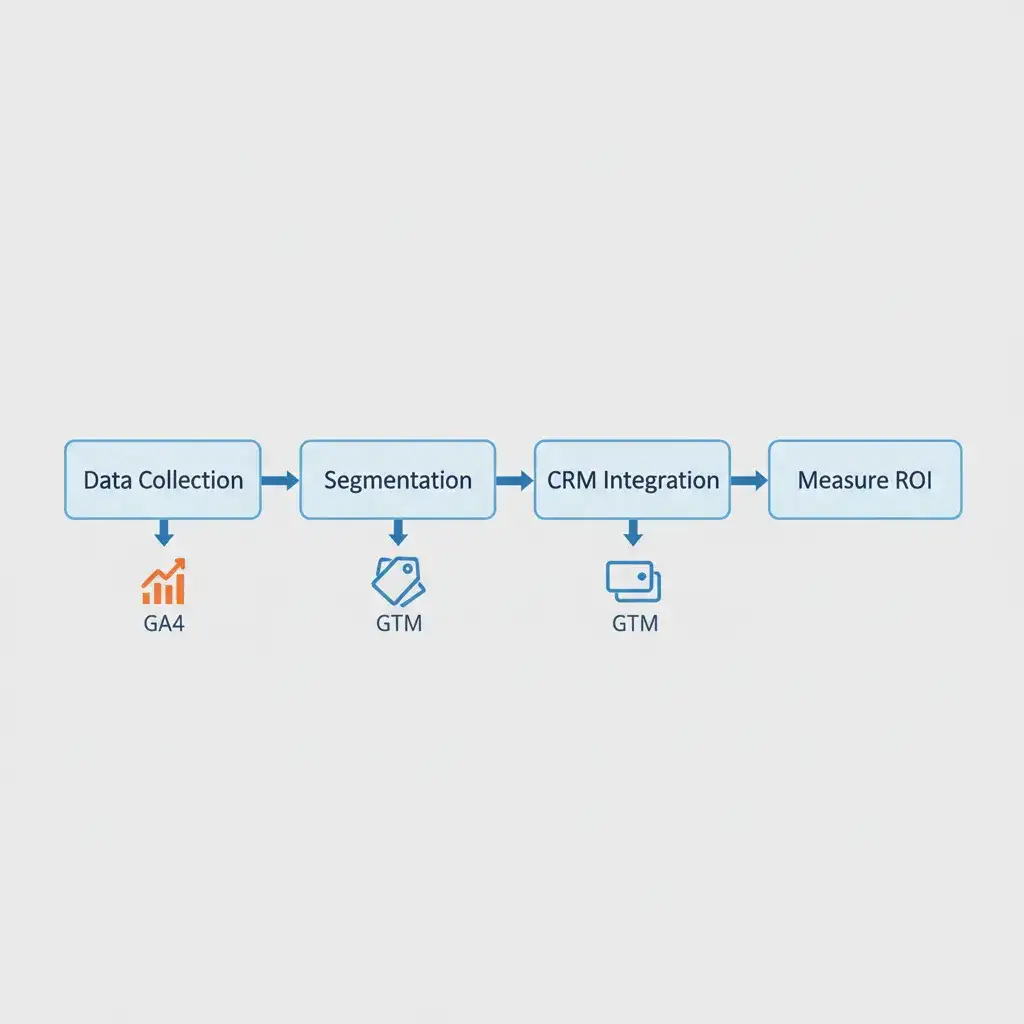
Introducing the GA4 User ID Activation & ROI Framework for SaaS & High-Churn Industries
For SaaS and high-churn industries, every single touchpoint counts. Our framework shows you how to use GA4 User ID data not only to understand user behavior but also to proactively boost customer lifetime value (LTV) and cut down on churn.
Stage 1: Data Collection & Validation
Make sure your `user_id` is consistently gathered across all touchpoints (web, app) and thoroughly checked for accuracy and uniqueness. This stage is all about building a rock-solid foundation. A key metric here? The percentage of sessions that have a `user_id` attached.
Stage 2: Segmentation & Personalization Opportunities
With a unified `user_id`, you can create incredibly powerful, persistent audience segments right within GA4. Imagine: “Users who viewed the pricing page on desktop but didn’t convert, and *then* opened the app on mobile.” These segments can then be exported to Google Ads, Google Optimize, or linked with your CRM for hyper-targeted marketing campaigns. This stage’s success is measured by how big those segments are and how often you activate them.
Stage 3: Integrating with Your CRM for Unified Customer Profiles
This is where the power of User ID truly shines! By passing a hashed or internal `user_id` to GA4, you can then link this data right back to your Customer Relationship Management (CRM) system. Ever had a user complain about not being able to find a specific user’s GA4 data in your CRM? This integration is your answer! Export GA4 segments to your CRM, or import CRM data (like subscription status, plan type) into GA4 using user-scoped custom dimensions. This creates a full 360-degree view, letting your sales and support teams see a user’s entire digital journey alongside their account history. Metrics include the percentage of unified customer profiles and the speed of data sync.
Stage 4: Measuring the Impact: From Reduced Churn to Increased LTV
The ultimate goal is to turn data insights into real, tangible ROI. By connecting user behavior identified through User ID with churn rates or LTV, you can quantify the impact of your personalization and retention strategies. For instance, track a segment of users who engaged with a specific feature (identified via User ID) and compare their churn rate to those who didn’t. This direct measurement validates your efforts and guides future product development and marketing spend. Success here is measured by LTV increase, churn rate reduction, and improved conversion rates for your targeted segments.
Practical Applications: Bridging App and Web Sessions for Seamless Experiences
Picture a user who starts a free trial on your website, then downloads your mobile app to get access to premium features. Without User ID, those are two totally separate journeys. But with User ID? You see one continuous path! This amazing capability lets you:
- Resume Journeys: If a user abandons a cart on the web, you can send them a personalized in-app notification.
- Cross-Platform Personalization: Deliver consistent messaging and feature introductions based on their full history, no matter the device.
- Unified Funnel Analysis: See if app usage after web signup actually leads to higher conversion or retention rates.
Leveraging User-Scoped Custom Dimensions for Deeper Insights
While `user_id` tells you *who* the individual is, user-scoped custom dimensions enrich their profile. These dimensions stick with the user for their entire lifespan in GA4. Think of examples like `customer_tier` (e.g., “Free,” “Premium”), `signup_source`, `company_size`, or `industry`. Combining `user_id` with `customer_tier` lets you analyze how different customer segments behave across devices, which features they use most, and how likely they are to churn. This super detailed segmentation is incredibly valuable for targeted marketing and product development.
Comparison: Client ID vs. User ID vs. Google Signals
| Feature | Client ID | User ID | Google Signals |
|---|---|---|---|
| Persistence | Browser/Device Specific | Deterministic, Cross-Device | Pseudo-Anonymous, Cross-Device |
| Cross-device accuracy | Low | High | Moderate (Modeled) |
| P.I.I. Handling | No PII | No Direct PII (Hashed acceptable) | No PII (Aggregated) |
| Integration with CRM | Limited/Indirect | Direct (via hashed ID) | No Direct CRM Link |
| Granularity of data | Session/Device-level | Individual User-level | Aggregated, Modeled |
Advanced Strategies for High-Churn Environments
In industries like SaaS, where user retention is everything, GA4 User ID tracking becomes a powerful tool for proactively fighting churn.
Identifying At-Risk Users with User ID Data
By using User ID alongside user-scoped custom dimensions and specific event tracking, you can define and spot “at-risk” segments. For instance, imagine a user who usually logs in daily but hasn’t logged in for 7 days, has viewed the cancellation page, *and* their `customer_tier` is “trial user” that’s a prime candidate for intervention! GA4 lets you build audiences based on these criteria, directly linking specific behaviors to an individual’s ID.
Personalizing Re-engagement Campaigns
Once you’ve identified at-risk users through their User ID, you can reach out to them with personalized re-engagement campaigns. Export these specific User ID segments from GA4 to your advertising platforms (like Google Ads, Meta Ads) or your email marketing system. The message can be perfectly tailored to their last known activity, their customer tier, or even features they haven’t used recently. For example, a “trial user who hasn’t used Feature X” could receive an email tutorial on Feature X, instead of just a generic promotional offer.
Ethical Considerations and Privacy Best Practices for User ID Tracking
While User ID tracking is powerful, it comes with big responsibilities. Prioritizing user privacy and ethical data handling is absolutely essential.
Data Minimization and Anonymization
Always stick to the principle of data minimization. Only collect the data you truly need to hit your business goals. For the `user_id` itself, make sure it’s an internal identifier that can’t be directly reverse-engineered back to PII (Personally Identifiable Information). Hashing techniques (like converting an email to a string of characters) are standard practice for this. Avoid storing sensitive PII directly in GA4, even within custom dimensions, unless it’s absolutely necessary and you have explicit user consent.
Compliance with Evolving Privacy Regulations (e.g., CCPA, GDPR)
Global privacy regulations like GDPR and CCPA set strict rules around how you collect, store, and use data. Ensure your User ID implementation includes:
- Clear Consent Mechanisms: Get explicit user consent for tracking, especially for non-essential cookies and identifiers.
- Data Subject Rights: Be ready to handle requests for data access, correction, or deletion. Since User ID links data to an individual, you must have processes in place to fulfill these requests completely.
- Data Processing Agreements: Make sure your contracts with vendors (like Google) include the right data processing clauses.
Regularly review your data practices against the latest regulatory updates. Goodish Agency advises a proactive approach to privacy, making sure compliance is built into your tracking architecture right from the start.
The Future of Identity Resolution: What’s Next Beyond User ID?
While GA4 User ID tracking offers a solid, first-party way to understand user identity today, the digital landscape keeps changing. The eventual disappearance of third-party cookies and growing demands for user privacy mean that first-party data strategies, like User ID, will only become even more important. We can expect advancements in:
- Privacy-Enhancing Technologies: Things like differential privacy, federated learning, and secure multi-party computation will likely improve data insights while keeping user privacy safe.
- Advanced AI/ML Modeling: GA4’s data-driven attribution models will get even smarter, using machine learning to fill gaps where direct tracking isn’t possible, all guided by strong first-party signals.
- Unified Customer Graphs: Businesses will continue to invest in creating comprehensive internal customer graphs that combine GA4 data, CRM data, support tickets, and offline interactions, using a persistent `user_id` as the primary key.
User ID in GA4 isn’t just a simple feature; it’s a strategic must-have for navigating the complexities of cross-device customer journeys. Getting it set up and activated correctly provides incredible insights, driving significant ROI for businesses willing to invest in a future-proof identity resolution strategy. Establishing this core capability now truly prepares your business for the analytical demands of 2026 and beyond.